

FUND REQUEST & WORKFLOW
FUND REQUEST & WORKFLOW
Approve team spending before the money leaves.
Approve team spending before the money leaves.
Approve team spending before the money leaves.
Staff raise a request, the right people approve it, and approved spend moves to payment and into your records. One clear process from request to completion.
Staff raise a request, the right people approve it, and approved spend moves to payment and into your records. One clear process from request to completion.
THE DIFFERENCE
THE DIFFERENCE
From scattered requests to organised spending.
From scattered requests to organised spending.
Other Tools
Money leaves first, questions come later.
A "yes" lost in calls, WhatsApp, and "I'll sort it out".
No one sure who approved what.
BrandDrive
Approved in the system before it moves.
Every request on record, with the amount and the reason.
One clear trail of who asked and who approved.
EVERYTHING YOU NEED
A smarter way to manage business spending.
Create requests, set approval rules and keep every spending decision visible from request to completion
Let staff request what they need
Route requests to the right people
Set approval rules
Approve from wherever you are
Keep every decision on record
Know what's still waiting

EVERYTHING YOU NEED
A smarter way to manage business spending.
Create requests, set approval rules and keep every spending decision visible from request to completion
Let staff request what they need
Route requests to the right people
Set approval rules
Approve from wherever you are
Keep every decision on record
Know what's still waiting
EVERYTHING YOU NEED
A smarter way to manage business spending.
Create requests, set approval rules and keep every spending decision visible from request to completion
Let staff request what they need
Route requests to the right people
Set approval rules
Approve from wherever you are
Keep every decision on record
Know what's still waiting
HOW IT WORKS
HOW IT WORKS
From request to approval,
without losing the trail.
From request to approval,
without losing the trail.
From request to approval,
without losing the trail.
Employees can request funds, managers can review and approve, and finance
teams can track what happens next from one connected workflow.
Employees can request funds, managers can review and approve, and finance
teams can track what happens next from one connected workflow.
01
Raise it
A staff member submits a fund request with the amount, the reason, and any
receipt or quote.
02
Route it
The request reaches the right approver
on time.
03
Decide it
You approve or decline, from your phone or desktop.
04
Pay and record it
Approved spend moves to payment and lands in your expense records and books, as one entry.
CONNECTED BY BRANDDRIVE
CONNECTED BY BRANDDRIVE
An approval is only the beginning.
An approval is only the beginning.
An approval is only the beginning.
Expenses
Once approved spending is completed, keep the resulting expense connected to the original request so the same information does not need to be entered again.

Payments
Move from approval to payment.

Accounting
Keep spending connected to your books.
Audit Logs
Know who did what and when.
Expenses
Once approved spending is completed, keep the resulting expense connected to the original request so the same information does not need to be entered again.
Payments
Take an approved request forward to payment while keeping the amount, purpose and approval history connected to the money leaving the business.
Accounting
Approved spending that becomes an expense stays connected to your financial records, giving you a clearer trail from decision to transaction.

Audit Logs
Keep a record of the actions taken across the account so important spending and approval activity can be traced back to the people behind it.

Expenses
Once approved spending is completed, keep the resulting expense connected to the original request so the same information does not need to be entered again.
Payments
Take an approved request forward to payment while keeping the amount, purpose and approval history connected to the money leaving the business.
Accounting
Approved spending that becomes an expense stays connected to your financial records, giving you a clearer trail from decision to transaction.
Audit Logs
Keep a record of the actions taken across the account so important spending and approval activity can be traced back to the people behind it.
THE AI THAT KNOWS YOUR BUSINESS
Ask what's happening with team spending.
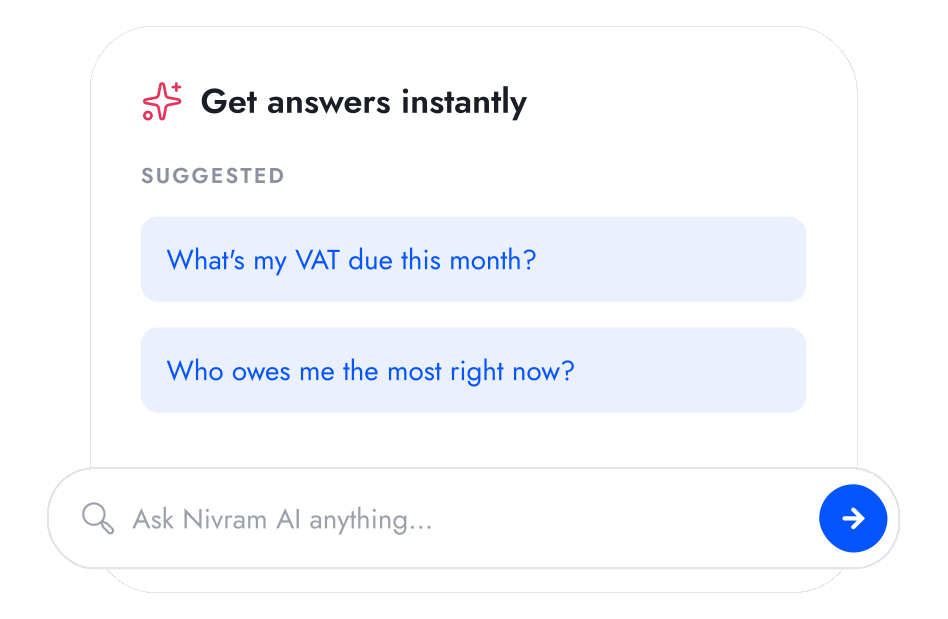
Nivram uses the information already inside BrandDrive to help you understand requests, approvals and business spending without checking every record yourself.
Explore Nivram
THE AI THAT KNOWS YOUR BUSINESS
Ask what's happening with team spending.
Nivram uses the information already inside BrandDrive to help you understand requests, approvals and business spending without checking every record yourself.
Explore Nivram
THE AI THAT KNOWS YOUR BUSINESS
Ask what's happening with team spending.
Nivram uses the information already inside BrandDrive to help you understand requests, approvals and business spending without checking every record yourself.
Explore Nivram
BUILT FOR
BUILT FOR
Designed for teams that need control over spending.
Designed for teams that need control over spending.
Designed for teams that need control over spending.

Growing SMEs
Put a proper approval process in place as more people begin spending money on behalf of the business.
Learn more



Multi-location Businesses
Review requests from different branches without relying on calls, chats or being physically present at every location.
Learn more

Enterprise Business
Use approval rules, multiple approvers and clearer accountability across larger teams and more complex spending decisions.
Learn more
Growing SMEs
Put a proper approval process in place as more people begin spending money on behalf of the business.
Learn more
Multi-location Businesses
Review requests from different branches without relying on calls, chats or being physically present at every location.
Learn more

Enterprise Business
Use approval rules, multiple approvers and clearer accountability across larger teams and more complex spending decisions.
Learn more

Growing SMEs
Put a proper approval process in place as more people begin spending money on behalf of the business.
Learn more
Multi-location Businesses
Review requests from different branches without relying on calls, chats or being physically present at every location.
Learn more
Enterprise Business
Use approval rules, multiple approvers and clearer accountability across larger teams and more complex spending decisions.
Learn more

Start free. Upgrade when you outgrow it.
Start running your business on BrandDrive, then add more team controls and approval capabilities as your operation grows.
See pricing
Start free. Upgrade when you outgrow it.
Start running your business on BrandDrive, then add more team controls and approval capabilities as your operation grows.
See pricing
Your questions,
answered
Your questions,
answered
Your questions,
answered
Can't find what you're looking for? Reach out to our
team at hello@branddrive.co
Can't find what you're looking for? Reach out to our
team at hello@branddrive.co
Can't find what you're looking for? Reach out to our team at hello@branddrive.co
What is a fund request in BrandDrive?
A fund request is a staff member's ask to spend business money, submitted with the amount and the reason, that an approver clears or declines before the money moves.
How do approval workflows work in BrandDrive?
A staff member raises a request, it reaches the approver, the approver approves or declines, and approved spend moves to payment and into your records as one entry.
Can I approve spending from my phone?
The intended behaviour is that approvers can approve or decline from the BrandDrive mobile app so approvals do not wait on desk access.
Does an approved request update my expenses and books automatically?
The design is that an approved request becomes a logged expense and carries into your accounting, so you are not entering it twice.
Who can approve requests?
You set who approves.
What is a fund request in BrandDrive?
A fund request is a staff member's ask to spend business money, submitted with the amount and the reason, that an approver clears or declines before the money moves.
How do approval workflows work in BrandDrive?
A staff member raises a request, it reaches the approver, the approver approves or declines, and approved spend moves to payment and into your records as one entry.
Can I approve spending from my phone?
The intended behaviour is that approvers can approve or decline from the BrandDrive mobile app so approvals do not wait on desk access.
Does an approved request update my expenses and books automatically?
The design is that an approved request becomes a logged expense and carries into your accounting, so you are not entering it twice.
Who can approve requests?
You set who approves.
What is a fund request in BrandDrive?
A fund request is a staff member's ask to spend business money, submitted with the amount and the reason, that an approver clears or declines before the money moves.
How do approval workflows work in BrandDrive?
A staff member raises a request, it reaches the approver, the approver approves or declines, and approved spend moves to payment and into your records as one entry.
Can I approve spending from my phone?
The intended behaviour is that approvers can approve or decline from the BrandDrive mobile app so approvals do not wait on desk access.
Does an approved request update my expenses and books automatically?
The design is that an approved request becomes a logged expense and carries into your accounting, so you are not entering it twice.
Who can approve requests?
You set who approves.